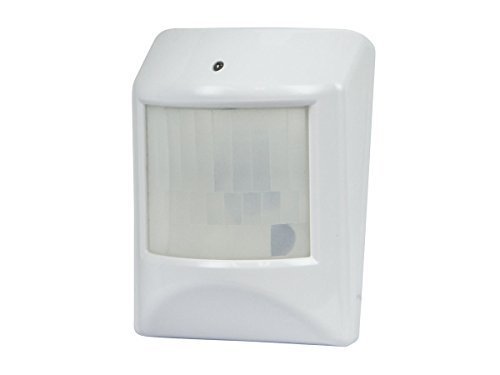
Monoprice Z-Wave Motion Detector with Temperature Sensor, NO LOGO by Monoprice
Brief information
- Uses an infrared sensor to detect motion and sends a Z-Wave signal when motion is detected within its detection range,
Fully compliant with other Z-Wave network devices, Includes adhesive tape and a CR123A battery for power.
How to add to VENUS app
- 1. Activation
- Press “Add button” (button ‘+’) in app
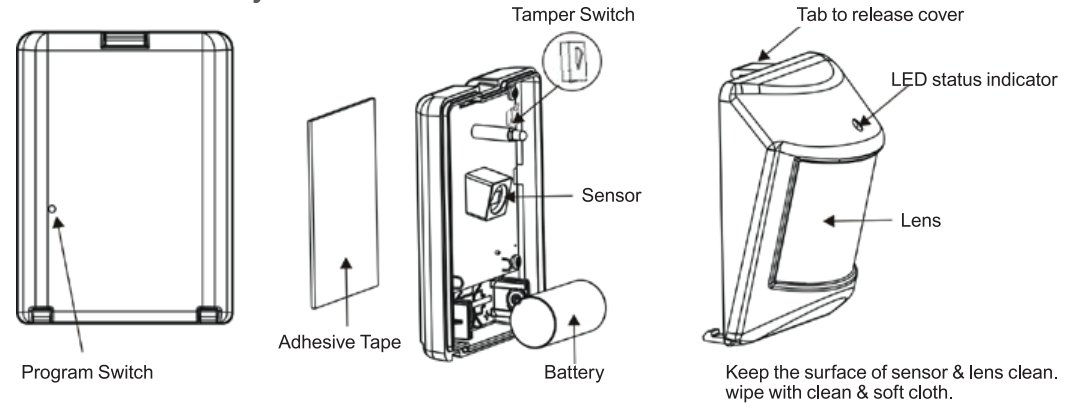
- Press and hold the program switch for 1 second
- LED will stop flashing and will glow steadily when pairing is completed.
- Wait for VENUS scan & detect this device and inform in app
- 2. Reset then re-add
- Press “Add button” (button ‘+’) in app
- LED will stop flashing and will glow steadily when pairing is completed (reset)
- LED will stop flashing and will glow steadily when pairing is completed again (re-add)
- Wait for VENUS scan & detect this device and inform in app
How to add/remove associated device(s) to
To add associated device(s) to this sensor, below action is required:
- Add z-wave notified-devices (which will be associated to this sensor) to VENUS
- Select Associate button and then select notified-device(s) to add
- Remove rear cover case to move sensor to awake mode
- If successful, pop-up notification displays in VENUS app
To remove associated device(s) from this sensor, below action is required:
- Select Associate button and then select notified-device(s) to remove
- Remove rear cover case to move sensor to awake mode
- If successful, pop-up notification displays in VENUS app
Configuration description
There is no configuration for this device.