Aeon Labs Recessed Sensor
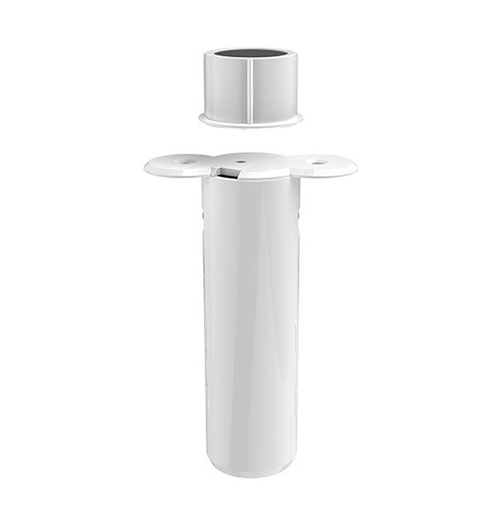
Brief information
- Aeon Labs Recessed Door Sensor Gen5 is a door detector that can detect the state of the door’s open/close. It is a notification sensor device based on Z-wave routing slave library V6.51.01
- Up to 100 feeds/30 metres indoor and 300 feeds/100 metres outdoor
- Battery lithium CR2, 3V, 800 mAh
- Work in -10 ~ 60 celcius, 8 ~ 80% huminity
How to add to VENUS app
- 1. Activation
- Press “Add button” (button ‘+’) in app
- Remove the plastic pull-tab from the back of device
- Wait for VENUS scan & detect this device and inform in app
- 2. Reset then re-add
- Press “Add button” (button ‘+’) in app
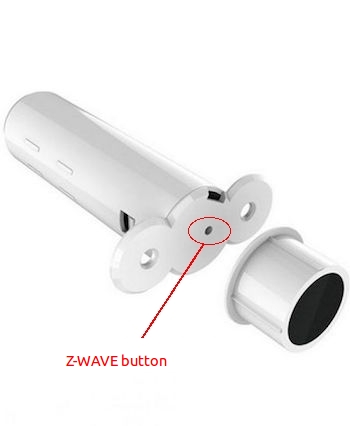
- Press z-wave button hiden under the hole on top of device to reset
- Press z-wave button again to add
- Wait for VENUS scan & detect this device and inform in app
Wake up information
Recessed Door Sensor will keep wake up for 10 seconds after it send wake up notification command. If it’s included into Z-wave network, the Recessed Door Sensor will wake for 10 minutes.
- Only 2 ways can abort this status:
- Z-wave Button held 6 seconds, then released, after 8 seconds, sleep right now;
- Recessed Door Sensor received “Wake up no more information CC”, sleep immediately;
Event and response
- Short press the Z-Wave Button
Add/Remove device into/from z-wave network
- Press and hold z-wave button for 6 seconds
- Device will be wake up and send Wake Up Notification with broadcast.
- Device will sleep after you released the z-wave button for 10 seconds, or sleep right away when received the Wake Up No More Information and then the led will turn off.
- Press and hold for 20 seconds
Recessed Door Sensor will be reset and send Device Reset Locally CC to controller.
How to add/remove associated device(s) to
To add associated device(s) to this sensor, below action is required:
- Add z-wave notified-devices (which will be associated to this sensor) to VENUS
- Select Associate button and then select notified-device(s) to add
- Wake-up this sensor: 1 time press z-wave button
- If successful, pop-up notification displays in VENUS app
To remove associated device(s) from this sensor, below action is required:
- Select Associate button and then select notified-device(s) to remove
- Wake-up this sensor: 1 time press z-wave button
- If successful, pop-up notification displays in VENUS app
Configuration description
Trigger signal to controller
- Type of signal trigger to controller when magnet switch open/close.
- Available:
- Trigger alarm to controller when magnet open
- Trigger alarm to controller when magnet close
Default: Trigger alarm to controller when magnet open
Parameter 1, 1 byte size
Trigger signal to associated device
- Type of signal trigger to associated devices when magnet switch open/close.
- Available:
- Trigger ON to associated devices when magnet open
- Trigger ON to associated devices when magnet close
Default: Trigger ON to associated devices when magnet open
Parameter 3, 1 byte size
Low battery checking
- Enable/disable the function of low battery checking, when the current voltage is less than the warning voltage, it will send the Battery Low Warning Report.
- Available:
- Enable low battery checking
- Disable low battery checking
Default: Disable low battery checking
Parameter 101, 1 byte size
Low battery checking interval
- Period of time that device auto checks low battery.
- Available: 0 ~ 0x7fffffff in seconds
- Minimun unit is 4 minutes. It means when user set 1 minute, interval time is 4 minutes and when user sets 7 minutes, interval time is 8 minutes.
- This setting will be activated when low battery checking is enabled (parameter 101)
- This device will also check current battery when it is waken-up
Default: 0x00015270
Parameter 111, 4 bytes size
Trigger report types
- Select kinds of report that device will trigger in case of events.
- Available:
- Trigger event to controller
- Trigger event to associated devices
Default: all above options are selected
Parameter 121, 4 bytes size.
Lock configuration setting
- Lock/Unlock configuration setting.
- Available:
- Lock
- Unlock
Default: Unlock
Parameter 252, 1 byte size