AEOTEC smart switch 6
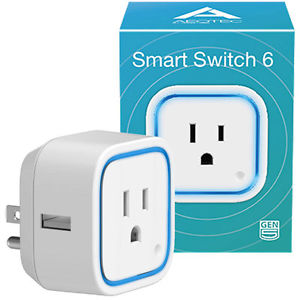
Brief information
Model number: ZW096.
Max standby power: 0.5W.
USB output: DC 5V±5%, 1000mA.
Operating temperature: -10 C to 45 C .
Relative humidity: 8% to 80%.
Operating distance: Up to 100 feet/30 metres indoors or
300 feet/100 metres outdoors.
- AC input:
- AU - 230V 50Hz, Max: 10A - 921.42MHz
- BR - 220V 60Hz, Max: 10A - 921.42MHz
- CN - 220V 50Hz, Max: 10A - 868.42MHz
- EU - 230V 50Hz, Max: 13A - 868.42MHz
- IL - 230V 50Hz, Max: 10A - 868.42MHz
- IN - 230V 50Hz, Max: 6A - 865.22MHz
- UK - 230V 50Hz, Max: 13A - 868.42MHz
- US - 120V 60Hz, Max: 15A - 908.42MHz
How to add to VENUS app
To add device to VENUS, below actions are required:
- Press “Add button” (button ‘+’) in app
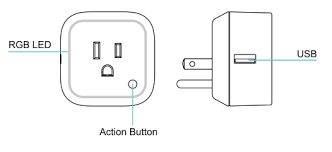
- Reset device: Plugin device to power-outlet, press Action button one
- Wait for VENUS scan & detect this device and add it to VENUS
Configuration description
Dimmer blink time
- This setting determines period of time that device blink its LED.
- Available: configure 2 below values.
- Value 1: 1 ~ 255: duration that dimmer blink, unit is seconds
- Value 2: 1 ~ 255: cycle ON-OFF duration, unit is 0.1 second
Default: Value 1: 15, value 2: 10
Parameter 2, 2 bytes size
Overload protection
- This setting enables/disables overload protection in this device. Enable this feature, device will be turned off when output load is over 2.6A and time is more than 2 minutes.
- Available:
- Enable overload protection
- Disable overload protection
Default: Disable
Parameter 3, 1 byte size
Output load status configuration
- Configure output load status after re-power on.
- Available:
- Restore last status
- Always ON
- Always OFF
Default: Restore last status
Parameter 20, 1 byte size
Enable send notification to associated devices
- Enable to send notifications to associated devices (Group 1) when the state of Smart Dimmer’s load changed.
- Available:
- Send nothing
- Send hail CC
- Send basic CC
Default: Send nothing
Parameter 80, 1 byte size
Change LED mode
- This setting allows user confirm operating mode in device via LED
- Available:
- Energy mode: LED status will follow its load on/off status
- Momentary indicate mode: turn the LED on for 5 seconds then turn off after every state change in the switch
- Night light mode: turn on/off LED follow configured time
Default: Energy mode
Parameter 81, 1 byte size
LED color in Night light mode
- This setting determines RGB LED color in Night light mode
- Available: select color by adjust input value in 3 below items
- Value 1: Green color - 0x00~0xFF
- Value 2: Blue color - 0x00~0xFF
- Value 3: Red color - 0x00~0xFF
Default: 0x1B-0x14-0x1B
Parameter 83, 3 byte size
LED color brightness level
- This setting determines brightness level (in %) of LED when device is in Energy mode or Momentary mode
- Available: select brightness by adjust input value in 3 below items
- Value 1: Green color - 1~100
- Value 2: Yellow color - 1~100
- Value 3: Red color - 1~100
Default: 50-50-50
Parameter 84, 3 byte size