GE Dimmer Switch
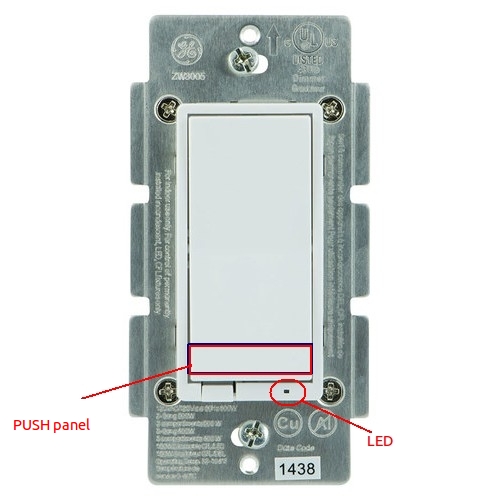
Brief information
- Power: 120 VAC, 60 Hz.
- Signal (Frequency): 908.42 MHz.
- Maximum Loads: 600W, incandescent
- Range: Up to 100 feet line of sight between the Wireless Controller and the closest Z-Wave receiver module.
- Operating Temperature Range: 32-104° F (0-40° C)
- For indoor use only.
How to add to VENUS app
To add device to VENUS, below actions are required:
- Press “Add button” (button ‘+’) in app
- Tap the top/bottom push pad to reset
- Tap the top/bottom push pad to add
- Wait for VENUS scan, detect this device and add it to VENUS
LED Indicator
The LED will be lit when the connected lighting is OFF.
Configuration description
LED indicator
- LED will show its status follow or revert with device.
- Available:
- LED status is invert with device status
- LED status is same as with device status
- LED is on all time
Default: LED is revert with device status
Parameter 3, i byte size
Invert switch
- This setting determines which switch tab is ON/OFF switch
- Available:
- Normal switch, Top - ON, Bottom - OFF
- Invert switch
Default: Normal switch
Parameter 4, 1 byte size
Ignore start level in dim command
- This setting allows user ignores start dim level embedded in dim command or not.
- Available:
- Ignore start level in dim command
- Get start level in dim command
Default: Ignore start level in dim command
Parameter 5, 1 byte size