Leviton DZMX1-1LZ Decora Z-Wave Controls Universal Dimmer

Brief information
- Soft fade ON/OFF
- Scene capable
- ON/OFF LED and Brightness level LED
- Two way communication
- RF reliability
- Ease of installation – No new wiring
- Compatible with other Z-Wave enabled devices
How to add to VENUS app
To add device to VENUS, below actions are required:
- Press “Add button” (button ‘+’) in app
- Reset device: Press Push pad and release when Locator light changes to red
- Wait for VENUS scan & detect this device and add it to VENUS
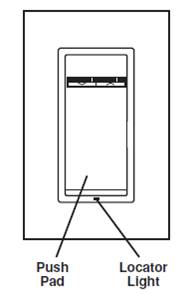
Factory reset
On the dimmer, gently pressing the top of the push pad until the bottom lifts completely out of the frame and wait 5 seconds. Press the push pad back into the frame and hold push pad until the locator LED turns Amber and then turns Red. The dimmer is now reset.

Configuration description
There is no configuration in this device.